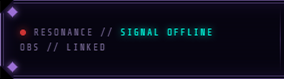
Leftmost zone. Shows WebSocket connection state and OBS link status.
Elements:
- Signal dot — 6px circle, teal when connected with a 2s pulse animation. Switches to red and stops pulsing when OBS disconnects.
- Status label — teal accent text, cycles through states:
CONNECTING→HANDSHAKE→SIGNAL STABLE→SIGNAL OFFLINE/RECONNECTING - OBS status — dim monospace label below the signal row. Shows
OBS // --until OBS WebSocket handshake completes, thenOBS // LINKED
Data source: OBS WebSocket connection lifecycle

Three stacked readouts for live stream health, plus a bitrate progress bar.
Top row:
- UPTIME — live stream duration in
HH:MM:SSformat. Shows--:--:--when offline. - DROPPED — frame drop percentage. Color-coded: teal (normal) → gold/warn (>1%) → red/crit (>5%), the crit state adds a blink animation.
- BITRATE — live kbps readout. Calculated between poll cycles. Same three-tier color system as dropped frames.
Bottom row:
- Bitrate bar — octagonal clip-path, segmented by 20 tick marks. Bar fill color mirrors the bitrate readout color state (teal → gold → red).
Poll interval: 2000ms. Fires a batch OBS request for GetStreamStatus + GetStats simultaneously.
 Shows the relative distribution of nodes across the three viewer domains. (Image showing sealed version until 5000 archive nodes (threshold points) have been earned.
Sealed state: Shows // SEALED in dim monospace text.
Unlocked state (post-t5000):
- Domain bar — a single horizontal bar track split into three contiguous colored segments:
- Teal
- Gold
- Purple
- Domain labels — three monospace labels (
AETHER,EMBER,OBSIDIAN) spaced across the width. The dominant domain’s label gets a color + glow class; the others remain dim.
Displays the current weekly node leader. Sealed until threshold 2500 is crossed.
Sealed state: Shows // SEALED.
Unlocked state (post-t2500):
- Bearer name (
#bearer-name) — Cinzel serif, 15px, gold with glow. Uppercase. Truncates with ellipsis on overflow. - Node count — The node count itself is gold-highlighted. Week label appended if present in state.

The most complex zone. Behavior changes based on OBS scene..
Display States
The zone has three mutually exclusive panels:
#music-no-signal— default idle text:// SONIC RESONANCE NOT DETECTED#music-scene-info— two-line label/value display used for Gameplay and Desktop scenes#music-player— the active player UI (title, artist, progress bar)
Scene Behavior
| Scene | Music | Zone E Display |
|---|---|---|
Stream Starting | Auto-starts, standard volume | Active player |
BRB | Auto-starts, standard volume | Active player |
Gameplay | Fades out (2.5s) | Scene info: // TRANSMITTING + game category |
Desktop | Manual toggle only | Scene info: // OPERATOR INTERFACE + player if music on |
| Unknown | Stops immediately | Scene info: scene name |
Active Player Elements
#music-title— track title in Cinzel, uppercase, truncates with ellipsis#music-artist— artist in Share Tech Mono, dim, right-aligned#music-elapsed/#music-duration— timestamps inM:SSformat#music-bar-fill— teal progress bar inside an octagonal track, width updated every second fromaudio.currentTime
Playback Logic
- Playlist loaded from
music.js - Track selection is random with no-immediate-repeat logic
- Set to automatically move to next track on song completion.
- Adjustable volume levels: Standard
-10 dB (0.316), Talking-18 dB (0.126) - Transitions use a 50ms-tick
fadeVolumeTo()interpolator — not the Web Audio API
Volume Controls (Desktop scene only)
Music.DesktopToggleWebSocket event — turns music on/off with a fade-in or 2.5s fade-outMusic.VolumeToggleWebSocket event — transitions between Standard and Talking levels over 1.5s- Both are also bound to keyboard keys
MandVfor testing