What It Is
The Archive is a complete stream production system: not a template, not a theme pack, but a purpose-built platform. Every visual element, every data pipeline, and every viewer interaction is custom-engineered to work together as a single coherent system. The result is a broadcast that feels like software — reactive, stateful, and alive.
The visual identity is built around arcane signal technology: dark near-black backgrounds, cut-corner octagonal geometry, and a teal/purple/gold color palette rendered in three custom typefaces. Every overlay maintains this language consistently, from a single notification to a full-screen cinematic event.
Technical Architecture
The system connects four layers:
Twitch → Streamer.bot → WebSocket → HTML Overlays in OBS
Twitch events (follows, subscriptions, raids, cheers, chat messages, channel point redemptions) are captured by Streamer.bot, processed by C# scripts, and broadcast over a local WebSocket server on port 8080. Browser source overlays running in OBS receive those events and update in real time. A persistent JSON state file acts as the source of truth for long-running data, read on overlay load and written by automation scripts.
Overlay Modules
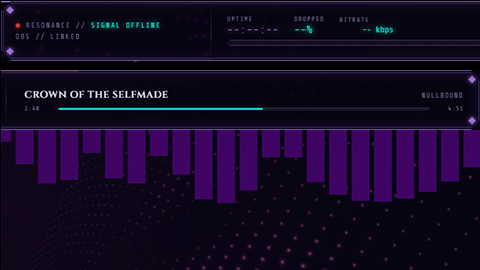
A full-width 1920×80 always-on overlay. Displays live signal status, stream vitals, and session metadata. Contains a built-in music player that activates automatically on specific OBS scenes (stream starting, BRB) and deactivates on others. Additional display panels (domain balance, featured viewer) are data-gated and unlock when collective engagement thresholds are reached — they render as sealed/locked until the conditions are met.
See more
Collective Stats Bar
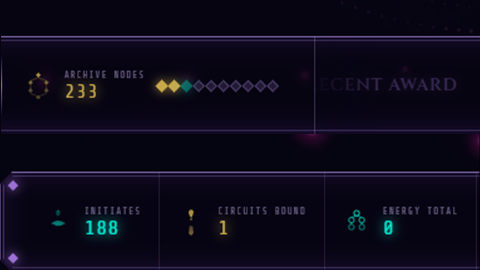
A second full-width 1920×80 bar displaying the channel’s cumulative engagement pool and session statistics in real time. Pulls live data from Streamer.bot via WebSocket and updates continuously throughout the stream.
Alert Overlay
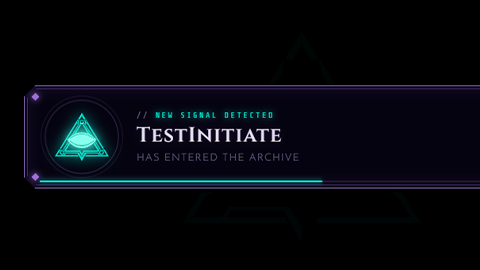
A full 1920×1080 transparent overlay handling all Twitch alert events: follows, subscriptions, gift subs, bits/cheers, and raids. Each alert type has a distinct visual treatment. A queuing system ensures alerts never interrupt each other, regardless of how rapidly events occur. A full-screen particle and FX layer activates during major events.
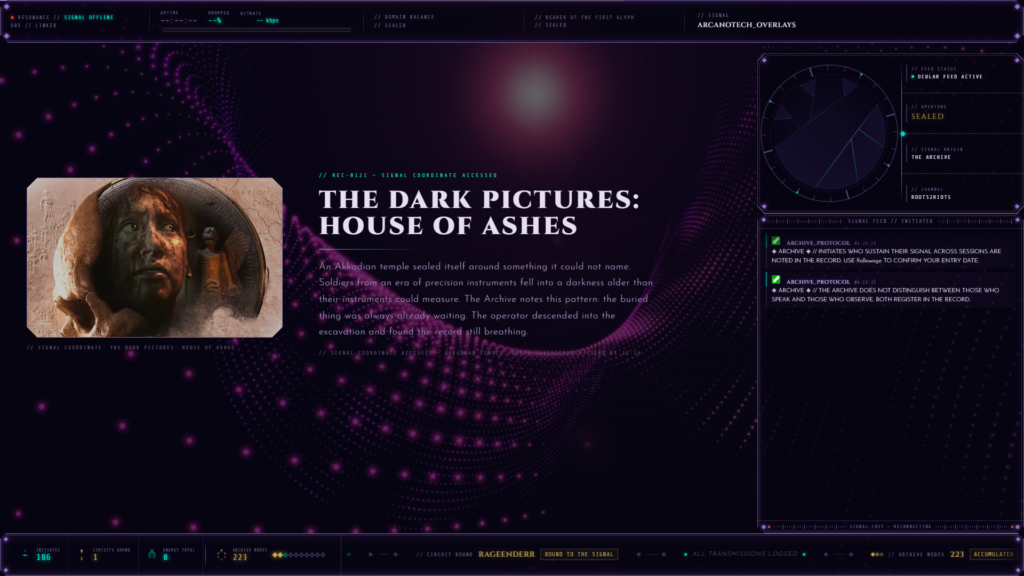
Streaming Starting Screen
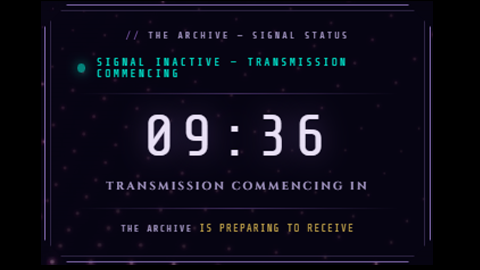
A pre-stream scene overlay featuring a live countdown to stream start and a rotating slideshow. Slide content is defined in a separate slides.js file (editable without touching the renderer), and the renderer supports multiple slide types: custom leaderboards and decorative glyph panels. Glyph artwork is custom SVG.
BRB Screen
A be-right-back scene overlay with an ambient slideshow supporting multiple content types: leaderboard panels, lore/message cards, friend-channel callouts, and image panels. Slide definitions live in a separate slides.js file.
Webcam Frame
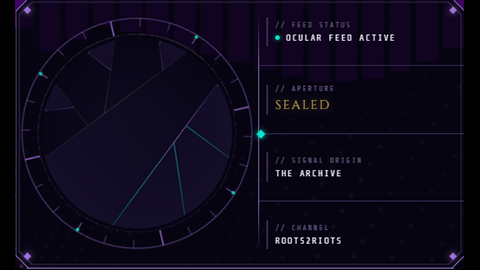
A 500×300 styled frame for the streamer’s camera feed. The defining feature is a canvas-rendered iris aperture mechanism: a set of animated blades that open and close over the camera like a camera shutter or mechanical iris, controlled via WebSocket commands from Streamer.bot. The aperture area is a true transparent hole cut into the panel background, so the webcam source in OBS shows through it directly — no chroma key required. Decorative SVG rings rotate continuously around the aperture at different speeds and directions. The panel geometry matches the octagonal clip-path aesthetic of the broader system.
Shoutout Overlay
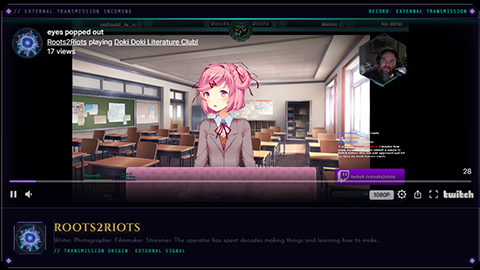
A full 1920×1080 transparent overlay that displays a styled shoutout card when the broadcaster runs a shoutout command. Pulls the target channel’s data (name, category, clip thumbnail) via Streamer.bot and renders it in a branded panel with the system’s visual language. Triggered and dismissed via WebSocket.
Objectives Panel
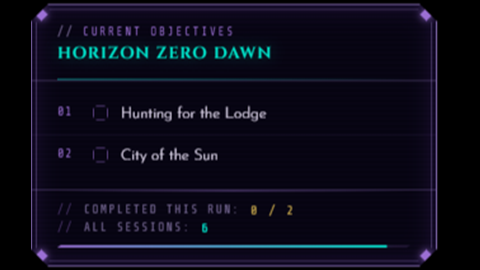
A persistent on-screen panel displaying the stream’s current task list or objectives. Items are managed via chat commands routed through SB_TodoManager.cs — the broadcaster can add, complete, and clear items from chat without touching the overlay. Renders in the system’s standard panel style with completion state tracking.
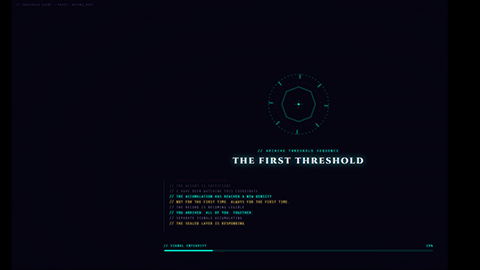
Threshold Event Overlay
A full 1920×1080 cinematic overlay that fires when the channel’s collective engagement pool crosses a major threshold. Renders a full-screen event sequence — background effects, animated title card, descriptive text — then returns to the normal stream view. Triggered by SB_ThresholdEvent.cs and dismissed by SB_ThresholdReturn.cs. Threshold values and event content are defined in a separate threshold-config.js file.
Automation Modules
Each script handles one specific concern. The architecture is intentionally modular — scripts don’t overlap in responsibility, and new behaviors are added by writing new scripts rather than modifying existing ones.
Event-Driven Node Award Scripts
A suite of scripts that award engagement points (“nodes”) for specific viewer actions: chat participation, follows, subscriptions, gift subs, cheers, raids, lurking, and channel point redemptions. Each script is independently triggered by its corresponding Twitch event.
Leaderboard & Roster Scripts
Scripts that maintain ranked leaderboards for nodes, subscriptions, gift subs, and raids. Separate scripts handle live sync to overlays, historical backfill, and roster management. Data is broadcast to overlays via WebSocket and can be rendered in any slide that requests it.
Archive State Scripts
Two scripts manage the persistent state file: one reads archive-state.json and broadcasts its contents to any overlay that connects (ensuring overlays are always initialized with current state on load), and one handles writes when threshold flags, domain balances, or featured-viewer data change.
Scene Change Detection
A script that listens for OBS scene change events and broadcasts them to all connected overlays. The header bar uses this to activate and deactivate its music player based on which scene is active.
Tracking & History Scripts
Individual scripts track and persist data for followers, subscribers, gift subs, and bits. Separate retrieval scripts can query current follower and subscriber lists on demand.
Threshold Event Scripts
Two scripts manage the threshold cinematic system: one triggers the full-screen event overlay when an engagement milestone is crossed, and one dismisses it and restores normal stream state. Threshold configuration (milestone values, event content) lives in a separate file outside the scripts.
Shoutout Scripts
A three-script pipeline handles shoutouts: one script receives the shoutout command, one fetches a recent clip from the target channel via the Twitch API, and one broadcasts the assembled shoutout data to the overlay. Splitting the pipeline this way keeps API calls isolated from display logic.
Utility Scripts
A todo manager script handles chat commands for the on-screen objectives panel (add, complete, clear). A timed message script sends scheduled transmissions to chat on a set interval. A category cache script stores the current stream category so it’s available to other scripts without repeated API calls. Separate music volume scripts provide manual control over the music player via Stream Deck triggers.
State & Data System
A persistent archive-state.json file stores the channel’s long-running state: which engagement thresholds have been crossed, current domain balance values, and featured-viewer data. Overlays read this file on load so they always reflect current state — a stream starting mid-campaign renders correctly without manual configuration. Streamer.bot writes to the file when state changes; all overlays receive the update via WebSocket broadcast.
A separate music.json file defines the music playlist used by the header bar and BRB/stream-starting scenes. Both data files are plain JSON and can be edited directly without touching any overlay code.
Slide System
The stream-start and BRB scenes use a decoupled slide architecture. Slide definitions live in plain JavaScript files (ss-slides.js, brb-slides.js) that specify content, timing, and slide type. Slide rendering is handled by separate renderer libraries that know how to display each type. This means slide content can be updated — adding a new leaderboard panel, swapping a message card, adding an image — without touching any rendering logic.
Supported slide types include: node leaderboards, subscription leaderboards, gift sub leaderboards, raid leaderboards, custom message/lore cards, friend-channel callout cards, and image panels.
Engagement Threshold System
The channel’s collective engagement is tracked as a cumulative pool. When the pool crosses defined thresholds, new overlay features unlock — sealed UI panels reveal themselves, new display zones become active, and cinematic events trigger. This means the stream’s visual complexity grows over time as a direct function of viewer participation. Early streams have a leaner UI; a high-engagement channel sees the full system.
AI Integration — OpenAI / GPT-4o-mini
Two features connect the system to the OpenAI API via Streamer.bot C# scripts. Both use GPT-4o-mini and are designed to be low-cost, high-character interactions — the AI responds in a consistent branded voice, not as a generic chatbot.
Archive Query — "Consult The Archive"
A channel point redemption where viewers spend points to ask a question and receive a response in chat. The answer comes through the broadcaster’s bot account, prefixed with the system’s signature format, and is written in the persona’s specific voice.
The system is built around a few key engineering decisions:
- Request queuing. Multiple redemptions can fire in rapid succession. The script maintains an in-memory queue and processes requests sequentially with a delay between responses, so chat never gets flooded and no response is dropped.
- Context injection. A separate editable JSON file defines keyword-to-context mappings. When a viewer’s question contains a recognized keyword (a character name, a game title, a lore term), the corresponding context block is automatically appended to the system prompt before the API call — without the viewer knowing. Questions about specific topics receive answers that are factually grounded in the actual lore, not improvised.
- Deflection without API calls. A configurable list of patterns (off-topic phrases, abuse patterns, trivial questions) triggers an instant in-character deflection response. These never reach the API — no latency, no cost. The viewer gets a response; the points are refunded.
- Automatic refunds. If the script encounters an error (API timeout, empty input, context file unavailable), it cancels the channel point redemption and returns the points to the viewer automatically, with an in-character explanation in chat.
The voice rules, context injections, deflection patterns, and deflection responses all live in a single external JSON file that can be edited without touching the script. The API key is stored as a persisted Streamer.bot global variable — it never appears in any file on disk.
Archive Recap — Periodic Chat Synthesis
A timed automation (typically every 30 minutes) that reads the rolling chat log, sends it to GPT-4o-mini, and posts a single synthesized observation in chat. Rather than summarizing what was said, the system prompt instructs the model to identify the underlying pattern or thread in the conversation — framed as the Archive noting what passed through the transmission window.
A separate logger script runs on every chat message and appends it to a rolling text file, capped at 200 lines and filtered to exclude bot accounts. The recap script reads the most recent 120 lines, includes the current stream category as context (so it can reference what’s being played or built), posts the response, then wipes the log. Each recap starts fresh.
The system prompt enforces specific voice rules: sentence case, no hedging, no lists, a mandatory response prefix, and a maximum length that fits within a single Twitch chat message. If the log contains fewer than 10 messages, the recap skips silently rather than generating a low-signal response.
Chat Commands — Archive Protocol
A unified C# script handles all branded chat commands through a single action dispatcher. Commands include node balance and rank lookup, follow age, collective threshold progress, lore fragments, unlurk announcements, and external links. Each response uses the same uppercase declarative voice as the rest of the system. Threshold-gated lore messages read archive-state.json at runtime to determine which content tier is currently unlocked, so the command pool expands automatically as the channel crosses milestones.
Development Practices
- No dependencies beyond the browser and a local WebSocket connection. Overlays are plain HTML files served from localhost — no build step, no framework, no server.
- Keyboard test mode in every overlay. Every overlay file includes a keyboard-triggered test mode that fires mock events without a live stream or Streamer.bot connection.
- Optional chaining on all event data. Streamer.bot event payloads can vary between versions; all field access uses optional chaining with fallbacks so overlays never crash on missing data.
- No localStorage or sessionStorage. OBS browser sources do not persist storage between scene switches; all state is held in memory or read from the JSON state file.
- No
position: fixed. Can cause rendering artifacts in OBS browser sources; all layout uses absolute or relative positioning. - Modular by design. Each overlay, each C# script, and each data file has a single responsibility. Adding a new feature means adding a new file, not editing an existing one.
Custom Adaptations Available
The Archive was built as a channel-specific system, but every component can be adapted for a different channel identity. A custom engagement system of this scope typically involves:
- Visual identity translation (color palette, typography, geometry, iconography)
- Overlay module selection and configuration (which scenes, which alert types, which leaderboards)
- Engagement threshold design (what milestones unlock what features)
- Slide content design for stream-start and BRB scenes
- C# script configuration for node values, leaderboard weights, and event handling
- State system design (what persistent data your channel needs to track)
If you’re interested in a custom build, reach out with details about your channel, your current tech stack (OBS version, Streamer.bot version), and what you’re trying to accomplish.